Canon DSLR 5D vs AF100: Part 2 – ISO 640

There continues to be a lot of buzz about Panasonic’s new AF100 camera, and whether or not it’s going to deal a deathblow to DSLR’s like the Canon 5D MkII. While I think not, there are many applications, from corporate video productions, Indie Films and even commercial productions,  where the AF100 will be a perfect fit. The camera is already in the hands of many video production crews and filmmakers, and reports I’ve seen are very positive. This is the second article in a series of tests on the AF100.

I wanted to see for myself just how the AF100 compares to the 5D in an identical set up, so I got my good friends and fellow DP’s Tom Myrdahl and Jefferson Miller to help me shoot some test footage here in my office at The Association. We’ve all had great success shooting with the 5D, and since Jefferson is the proud new owner of an AF100, we were naturally curious to see how they compare.

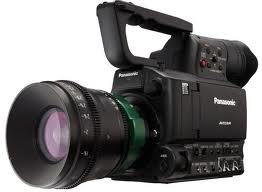
The 5D has a Sigma 50mm 1.4 lens, and the AF100 an Olympus Zuiko 14-35 mm f2, attached with a DMW-MA1 Panasonic adaptor.
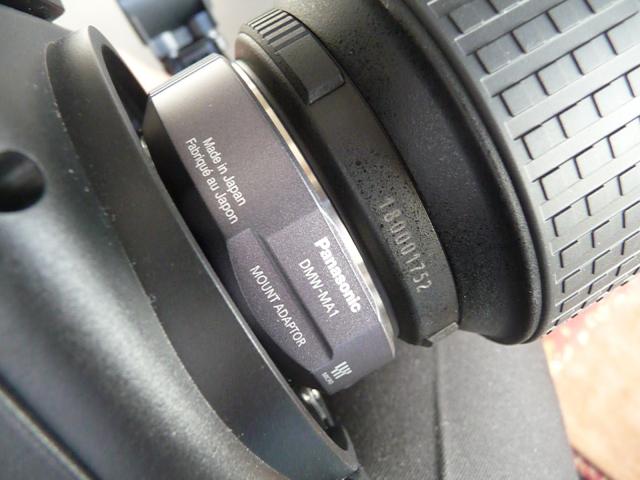
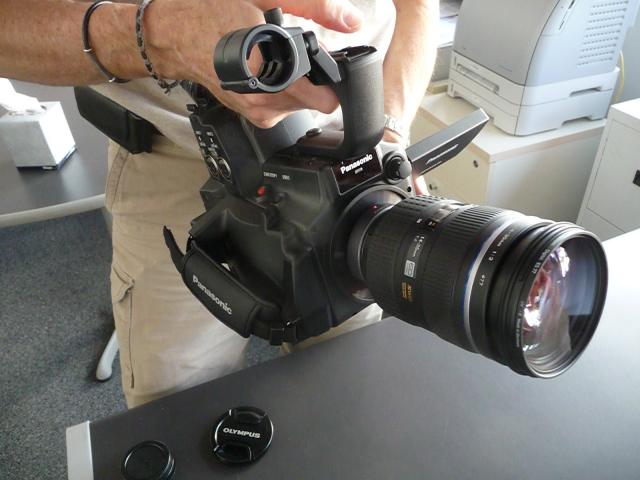
af100adapteraf100&lens

We called in our good friend, the very talented Jessica Drolet to be our model, and lit her with a 250 watt china ball for a key, a small Lite Panel for fill and a 150 Arri backlight.

This is the second clip in our side by side comparison. We upped the ISO to 640, with the 5D at f2.5 and the AF100 at an f2.

Make sure you select the 720p version.


Quicktime streaming versions: www.theassociation.tv/videostore/5DvsAF100_Part2.mov

We decided to stay with multiples of 160 ISO that give the cleanest image in the 5D, and were interested to see how the blacks look once we start cranking up the ISO of both cameras, especially the AF100 at those ISO multiples. In future testing, we will set the ISO on the AF100 at multiples of 200, as 200/400 seem to be its native ISOs.

Having said that, I do really like the look of the blacks on both cameras at these settings, and the AF100 looks really good at 640.

We welcome your comments and questions. Not familiar with the Canon 5D yet?
Get hands-on training at the next Canon Boot Camp.

Look for Part 3 of our series coming soon, where we dial up the ISO to 1250.

Online Visibility and Press Releases, Part III

Trevor Eisenman's Press Release SeriesNote: This is Part III in an seven-part series I’m writing about Press Releases. Press releases are possibly an overlooked item in the enterprise social media toolbox, so I’m going to cover a few points and talk about how I’ve used them successfully for client campaigns.


Search Engines Have Categories
Google, Yahoo and Bing all have a “web” search engine (also called “organic” search, the search field one sees when one goes to these sites to search for information).  They also have their “news” search engine and one typically clicks on “News” to see the latest in that category.

A press release written in an optimized-for-search manner and correctly issued in top performing  newfeeds will appear on page one of both News and information search engines.   The news search engines are continually adding new stories and keep a press release in search results for about 28 days.

The “web” search or organic search also returns the press release in search results within 24 hours of releasing the story. These stay on the search engines indefinitely.  They appear on page one and can stay there for months or years. Depending on what your consumer analysis reveals (your target market might not trust or care about press releases), including press releases in your corporate social media plan might be very beneficial for your message.  

Social Media Search Engines
Bing is the search engine for Facebook, so press releases can also appear in Facebook searches.
Some of the new feeds are also tweeting the story and Google Real-time will show the blogs it also appears in. So you can actually get some social media action without asking for it, due to the search nature many social networking sites.

  Click this button to Connect

Canon 5D vs Panasonic AF100 – Part 1

There continues to be a lot of buzz about Panasonic’s new AF100 camera, and whether or not it’s going to deal a deathblow to DSLR’s like the Canon 5D MkII. While I think not, there are many applications, from corporate video productions, Indie Films and even commercial productions,  where the AF100 will be a perfect fit. The camera is already in the hands of many video production crews and filmmakers, and reports I’ve seen are very positive. This is the second article in a series of tests on the AF100.

I wanted to see for myself just how the AF100 compares to the 5D in an identical set up, so I got my good friends and fellow DP’s Tom Myrdahl and Jefferson Miller to help me shoot some test footage here in my office at The Association. We’ve all had great success shooting with the 5D, and since Jefferson is the proud new owner of an AF100, we were naturally curious to see how they compare.

We called in our good friend, the very talented Jessica Drolet to be our model, and lit her with a 250 watt china ball for a key, a small Lite Panel for fill and a 150 Arri backlight.

Since most of the talk out there is about sensor sizes and bitrates, I was first interested in two things; how the AF100′s 24Mbps bitrate and the depth-of-field of the 4/3 sensor would compare to the 5D’s 44Mbps bitrate and full-frame 35mm still sensor.

Take a look for yourself. (Make sure you select 720p version)

View Quicktime here:  theassociation.tv/videostore/AF100vs5D_Part1.mov

Not surprisingly, the 5D has a more shallow depth-of-field. The AF100 has a very good look and the image holds up well at the 24Mbps bitrate. The 4/3 sensor of the AF100 is very close to 35mm motion picture frame size, so it will have similar depth-of-field characteristics to those film lenses and cameras. I’m surprised at how well they match color-wise and I think images from these cameras would cut together very well.

Be on the lookout for Part 2 coming soon, where we start cranking up the ISO.

Canon Boot Camp Graduates

The Best DSLR Workshop in Town

Below is a list of graduates from The Association 2010 Canon Boot Camps that have received our special Canon certification. A couple of graduates have created videos using a Canon DSLR 5D or 7D, and a link is included next to their name so you may see their work.

We respect the privacy of our students and do not share their personal information. If you wish to contact them for any reason, including jobs or production, please contact our alumni liaison, Tom Murray, at tmurray@theassociation.tv or call us at (818)841-9660, and we will gladly help with your inquiry.


Pro Level I – March 27, 2010

Amy Berg
Heather Welborn
Allene Quincy Anderson
Skott Snider
Chad Slattery
Cathy Wang
Trampas Thompson
Thomas Myrdahl
(video)Boot Camp Cert

Pro Level I – April 10, 2010

Daniel Pearl, ASC
Oscar Alvarez
Loren Roberts

Mike Berkofsky
Charles Jessen
Joe Maxwell
James Boyd
John Smith
Dan Ayers
Michael Ozier
Alice Gu
Mario Signore

Each of our graduates receives a Canon certification of their newfound expertise in DSLR film making.

Pro Level I – April 24, 2010

Jefferson Miller
Christopher Johnson
Stephen Franklin
Eric Haywood
Michael Brewer
Pa Cadichon
Chris Robertson

Pro Level I – May 22

Bob Stevens
Erica Dunton
Richard King
Chad Bonanno
(video)
Geary McLeod, ASC
Chip Bolcik
John Putch
Danny Tolli
Thyrale Thai
James Boyd
Frank Addelia
Richard Handley
Frank Flowers
(video)

Pro Level II – May 29

Robert Stephens
Trampas Thompson
Eric Haywood
John Ames
Bob Stevens
Jefferson Miller
Richard King

Pro Level I – June 26, 2010

Marcelo Lewin
James Wvinner
Austin Reading
Sam Mark
Kristoffer Dios
Oliver Chow
Nile Evans
James O’Keeffe
Ken Montgomery

Pro Level I – July 17th

Armen Meymarian
Jason Knight
Carmella Hatter
Joseph Dufrene
Adrian Castagna
Jeff Weakley
Shawn Pinner
Michael Dean
Vince Giacco
Theresa Hoey
Jacob Hatley
Bradley Smith

Pro Level II – July 31st

Jason Knight
Oliver Chow
Jeff Weakley
Anthony Hemmingway
Armen Meymarian
Carmella Hatter

Pro Level I – August 21st

Daniel Harutunian
David Jellison
Tom Faigh
Kumala Nio
Michael Franks

Pro Level I – October 9th

John Knowles
Francisco Cortinas
Dutch Merrick
Erica Eng

Pro Level I – October 23rd

Neal D. McConnell
Aimee Long
Frank Carlos
David Gasperik
Christopher DelaGarza
Lester Schwartz
Chris Yu
Brandon Doo

Pro Level I – Private Sessions

Robert Stevens (May 27, 2010)
John Ames (May 27, 2010)

Online Visibilty and Press Releases, Part II

Trevor Eisenman's Press Release SeriesNote: This is Part II in an seven-part series I’m writing about Press Releases. Press releases are possibly an overlooked item in the enterprise social media toolbox, so I’m going to cover a few points and talk about how I’ve used them successfully for client campaigns.

How long does a Press Release stick around?
I wish there was a standard answer to that question. We’ve had press releases hang out on the 1st page of Google for as long as a year. Typically press releases start to drop off the news search engines after 28 days. They aren’t news anymore! But if the research was done well, PRs can continue to show up well on search engine result pages for several months. Or more.

An important factor is how much competition there is for the topic and the search keywords that were chosen. Having long tail keyword research experts on hand for press release writing will potentially save you a lot of grief!  If a lot of other companies are vying for the same spot, it might be hard to keep a press release on the 1st page for more than a few days. Maybe even for a few hours.

Again, this is where experience really counts. A well researched, well thought out press release might make it to the 1st page of a search engine results page. But if it drops off just as quickly as it arrived, what good is it? Pick a good topic and the right keywords.

Click this button to Connect


Digital Camera Class Creates Thriller Short

Canon DSLR 5D Boot Camp Instructor Snehal Patel and Model ham it upOne of The Association’s 2010 innovations was our Canon DSLR Boot Camp. Realizing the game changing nature of the Canon DSLR 5D and 7D, we took it upon ourselves to provide training for both new videographers and seasoned pros.


There are two levels to the boot camp. Level I is more of a beginner’s class, so pretty much anyone interested may take it. We’ve given our own Canon certification to still photographers looking to add video to their repertoire, all the way up to pros such as Daniel Pearl, ASC and Geary McLeod, ASC.

Level II is where the real hands-on action occurs, and the students film a short. The Association staff come up with a script, and the students shoot it using the Canon DSLR 5D. If the students don’t have their own cameras, we provide DSLRs as well as any related equipment. This gives everyone a chance to give the theory they learned in Pro Level I a swing in the real world, as well as walk away with credits on a great visual asset. So it’s not just any old Canon camera class!

The vampire short below was created by the Level II grads from the Pro Level II Boot Camp we held in October 2010. We chose a Film Noir, black and white setting to show off the exceptionally thick, rich (no grain) blacks the Canon 5D can produce.

The class used a dolly, jib arm and car mounts to follow the nun’s escape from a dangerous, blood-sucking casting call:

Special thanks to EVS in Burbank for the use of their facilities and generous support, to all our talented cast and crew, and to Vara Reese for her editing. If you’d like information on the next available Canon camera classes, the upcoming classes are posted here.

Jeff Murphy – Head of Production and Director of Photography at The Association

Jeff Murphy, Production Manager and Director of Photography at The Association

Jeff Murphy is a partner at The Association and a crucial part of our corporate video production services. With an eye for detail and a professional grip on all aspects of video production, Jeff has overseen all of The Association’s projects for the past 22 years, expertly guiding them from start to finish. No matter how big or how small, your production is in good hands with Jeff.

Jeff Murphy – Head of Production and Director of Photography at The Association

Jeff Murphy, Senior Production Manager/Director of Photography at The Association

Jeff Murphy is a partner at The Association and a crucial part of our corporate video production services. With an eye for detail and a professional grip on all aspects of video production, Jeff has overseen all of The Association’s projects for the past 22 years, expertly guiding them from start to finish. No matter how big or how small, your production is in good hands with Jeff.

Importing Panasonic’s AF100 AVCHD Files into Final Cut Pro ( A Workaround for Power PC Computers)

There continues to be a lot of buzz about Panasonic’s new AF100 camera, and whether or not it’s going to deal a deathblow to DSLR’s like the Canon 5D MkII. While I think not, there are many applications, from corporate video productions, Indie Films and even commercial productions, where the AF100 will be a perfect fit. The camera is already in the hands of many video production crews and filmmakers, and reports I’ve seen are very positive.

I recently had the opportunity to work with some test footage shot with the AF100. We set up a comparison of the AF100 and the Canon 5D in a side by side shooting scenario.(More on those results in a later article.)

Af100

 FCP Logo

arrow


Excited to see how the footage between the two cameras compared, I dumped the AVCHD (Advanced Video Codec High Definition) files into my computer using the USB adapter that comes with the AF100, and thought to myself, “USB, this is going to take a while”. But, it was surprisingly quick due to the MPEG-4 AVC/H264 compression codec that the AF100 uses to record.

The AVCHD files have a .mts (MPEG Transport System) file extension. I wanted to transcode them to ProRes 422 Quicktime files for importing into Final Cut Pro. Piece of cake, right? With an Intel processor running FCP 6.02 or higher, yes,  it’s easily accomplished using FCP’s Log & Transfer function. Just make sure you include all the folders to keep the file structure intact.

However, if you’re on an older Power PC platform like I was, it’s a problem. The AVCHD format is not supported on Power PC processors. So what do you do if you’re in a similar situation?

Fortunately, there are workarounds.

You can use MPEG Stream Clip, a free software from Squared5  to transcode the files To ProRes 422. I’ve used this software many times in the past and it works great, but it does seem to introduce some gamma shift,  crushing the blacks a bit. This is correctable in post, but I wondered if there was something else out there to do the job.

You can use Compressor, but it doesn’t recognize .mts files. The files need to have the Quicktime wrapper.

After trying a few things I settled on a software called ClipWrap from Divergent Media. ClipWrap rewraps the files into Quicktime very fast, and with no affect on the image in my opinion. You can then take those files into Compressor and transcode to ProRes 422. Or, ClipWrap can also even do the transcoding to ProRes 422, eliminating the need to use Compressor. But, at only $49.00, I’m doing further testing to see if it holds up to the quality of Compressor.

For rewrapping, ClipWrap worked great. At $49.00 it’s certainly worth investing in, especially if you happen to be working on an older Power PC platform. Try the free test version first, and see if you like it. We’d love to hear your results!

Online Visibility and Press Releases, Part I


Trevor Eisenman's Press Release Series
Note: This is Part I in an seven-part series I’m writing about Press Releases. Press releases are possibly an overlooked item in the enterprise social media toolbox, so I’m going to cover a few points and talk about how I’ve used them successfully for client campaigns.

News vs. Information

Search engines categorize news and information differently. News kind of has an expiration date. Is the Grand Opening of a new store in downtown Metroville still news 6 months after it happens? Not really. It’s just information. This is where Press Releases have an advantage over articles, blog posts and other information, when it comes to short term visibility.
   
By nature, press releases are about news. Normally a press release wouldn’t be written about a restaurant’s menu or how to get rid of pond scum. That’s just information. But if there is a newsworthy angle to pond scum, a press release could be written about it. And you can get that press release to show up on the 1st page of a Google Search for certain keywords, practically overnight. I had one client’s Press Release show up in 8 hours on the first page of Google once it had been distributed.

Of course, you have to know how to research, write and issue press releases in an optimized-for-search manner for it to work right. But if reputation management is on the agenda for your corporate social media campaign, press releases can be a powerful tool.

Even if reputation management isn’t on the menu,  press releases can be used as part of an effective marketing plan.  I suppose press releases aren’t technically an enterprise social media topic, but I often suggest them for creating immediate online visibility, while leveraging other social media tools (Facebook, Twitter, etc.) for medium range to long term online visibility.

Whether a company has been around for awhile, or is just starting out, Press Releases can offer visibility without breaking the bank the way a Pay Per Click campaign might. First, try to nail down what news you’d like to make known. Is there a niche or aspect of your business that’s newsworthy? What sets you apart from your competition?

Click this button to Connect


.