DSLR Filmmaking & Lenses: What You Should Know Now Series

This week features a series titled: “DSLR Filmmaking & Lenses: What You Should Know Now,” a series of blog posts explaining the importance and benefits of specific types of camera lenses (ultra wide, wide, normal, portrait, telephoto) by contributor Jeff Bauer

Introduction: Sensors and Lenses

In the world of film and video, there are many different types of lenses, typically organized by focal length.
  1. Ultra Wide: < 21mm
  2. Wide: 21- 35mm
  3. Normal: 35 – 70mm
  4. Portrait: 70 – 135mm
  5. Telephoto: 135 – 300mm
When searching for a specific look for your images, it’s important to take into account a wide array of details. Size, weight, focal length, and aperture all play an important role, but there are other determining factors such as the lens mount, focusing mechanisms and sensor size.
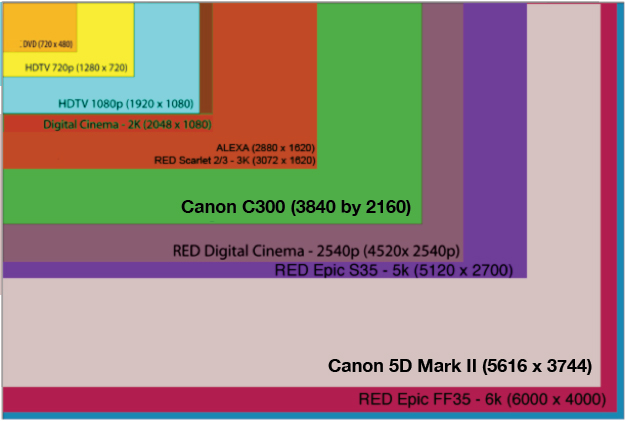
Camera Sensor Size Comparison Chart
We know that digital cameras and DSLR cameras use sensors, not film, to produce images. The size of that sensor directly determines factors such as the depth of field and the focal length of the image. Essentially, the final product is a collaboration between the lens and the camera. Each lens has its own specific focal length and each camera effects that focal length by a crop factor based on the size of the sensor. The actual focal length produced is then different than what the lens says, effectively changing the perspective of your video. All lenses still use 35mm film terminology despite the multitude of sensor sizes and crop factors in the video world. You just basically have to do the math and you’ll never have to buy the wrong lens.
Typically, smaller cameras have smaller sensors, allowing for lenses to also be smaller, effectively shrinking the focal distance between the camera sensor and lens. This focal distance is important when mounting lenses not designed for your camera. If the lens elements are too close or too far away from the sensor, the image will be blurry and unable to focus correctly. The lens also needs to be able to cover the whole sensor so that there’s no vignetting on the image. If we take this principal further, the larger the sensor, the larger the lens needs to be to cover the entire sensor. A small sensor lens mounted to a camera body designed for larger lenses, cannot cover the entire frame, again causing vignetting.
Things start to get interesting when you take a larger lens and mount it to a camera with a smaller sensor. Because the lens easily covers the sensor, the image will appear to be zoomed in, showing a narrower field of view, and resulting in an increase in actual focal length. All that is needed is a way to mount these lenses to your body while maintaining the correct focal distance. A simple adapter can mount a lens from another company or format onto your camera, allowing a larger selection of lenses to be utilized that wouldn’t normally be used together (ex. Legacy Nikorr lens on a Canon body).
Example: A Canon 5D Mark III has a full frame sized sensor (35mm equivalent) and the Canon 60D has an APS-C sized sensor, which is smaller than full frame. When you take a 24mm lens and mount it the 5D, the sensor matches the lens and a 24mm focal length is actually visualized. Now, the 60D has a crop factor of 1.5x which means that the 24mm lens would actually show you a field of view similar to a 35mm lens. The smaller the focal length, the more distance is magnified between objects, giving a slightly distorted perception, whereas a longer focal length appears to compress distance, creating a flat image and a shallow depth of field.
All of these principals are key when deciding on a lens. The more you know about your camera, the more you’ll know about what lens type you are looking for.
First Up in the Series – Part I: Ultra Wide Angle Lens

 

Roly polies climbing the walls

The "Cool" BugOften you don’t notice something is missing until it appears.

One of my favorite childhood items of interest was the roly poly. It probably has the best “PR” (Public Relations) of any insect and it is an instant favorite among kids, unlike spiders and red ants or ants in general. Certainly the cockroach is universally loathed, but the roly poly is held in such high esteem grown men and women will avoid stepping on this charming little bug. Actually it isn’t a bug. It isn’t an insect. It is a terrestrial crustacean, related to the shrimp.

If it were know by its scientific name, Armadillidium vulgare, it would be squashed in an instant.

And just so you know, vulgare, distinguishes itself from Armadillidium nasatum and Armadillidium depressum, the only other British species in the genus, by the gap that A. nasatum and A. depressum leave when rolling into a ball; A. vulgare does not leave such a gap.

But why are they climbing the walls at my house? Twelve maybe fourteen of them. Five more laying on their backs on my front stairs, which means I have to adroitly step over them as I do my morning exercise of stair climbing.

This means I have thirty minutes (I climb the stairs for thirty minutes each morning) to consider what could cause this sudden appearance of Arm-a-dill-IDUM vul-GAR-e. It must be breeding season. There’s nothing to eat on my steps or walls (or maybe there is if I had a microscope), but at least nothing visible.

They breathe through gill like structures which means they need moisture. So why climb the walls? AH! They must be collecting the morning dew. Bingo.

This puts to rest my filthy thoughts of roly polies getting drunk and rolling in the polly. In fact, I find out they reproduce by parthenogenesis. This method was used around the Parthenon in ancient Greece. No, seriously, Parthenos, in Greek means virgin. So these roly polies are all single parents. Their photo albums have no family pictures with Mum and Dud, and Granny and Gramps. Their family tree is a straight line with clumps of offspring. This explains why there is no Victoria Secret for roly polies. Why bother?

So as near as I can tell, they climb the wall by my staircase, suck up all the moisture they can drink, get high on oxygen, lose their balance and fall down, down, down to my stairs where they lie unconscious. Slowly they come to, still groggy from the great time they had. They wiggle their fourteen legs in the air for an hour or two…and then slowly turn over.

The trouble is that I exercise on the steps. I walk up and down for thirty minutes five times a week. I wear a size 16 shoe. That’s not good news if you’re a roly poly. But do they care? No. They lie there secure in the knowledge that they are cool because they are roly polys and it is politically incorrect to squash this purple little guy. And they’re right.

So if any of you have any data on this, please let me know.

Signed,

Tiptoeing through the Polys


Finding the Woman with the Golden Voice

The best of voices for the best of vehicles
How good does a voice have to be for The Association to put it in a client’s vehicle navigation system?
Pretty good. In fact, when you consider some people will hear our voice talent more than their significant other, it really demands a careful selection process.
We apply eleven criteria when we’re casting for a voice.  These are the voice characteristics on our selection grid:
  1. Is it a voice you’d like to listen to every day?
  2. Does the voice talent read the line fast enough for you to make a quick maneuver on the freeway but not so fast that you can’t understand her?
  3. Does the voice talent sound like she’s sincerely interested in your safety and not just doing a job?
  4. Is her voice warm yet businesslike?
  5. Is the “energy level” in her voice engaging to you and not abrasive or too withdrawn?
  6. Does the voice talent sound like she’s taking responsibility for you and the car’s safety?
  7. Does she sound knowledgeable? Someone you would follow in a crisis?
  8. Is her diction and enunciation perfect?
  9. Does she have “class” (without being snobby)?
  10. Is she pleasant and trustworthy or does she talk like a robot?
  11. The last step we take is to look into their private lives a bit.  Are they stable professionals who will be available to us exclusively for years to come or will they take off onto another career and leave Los Angeles? This is important because we often build the navigation computer’s voice files over decades and we must have the voice talent’s commitment to work with us over the long haul.
These are the criteria we apply to all our voice talent.  This is the process that’s produced six sigma quality files for years.  (We use the Neumann U87 microphone, exclusively, but we’ll talk more about the signal path in a later blog.)
We provide voice files in whatever language you need because we’re located in Hollywood, which attracts a large pool of talent to record voices for films to be released overseas. Plus, we have great international connections and we can find voice talent for virtually any car or telematic application: French Canadian, Spanish, German, Portuguese, American, British, North American Spanish, Korean, Japanese, Farsi, Hebrew, Finnish, Swedish and on and on.

If you’d like to hear an example of one of our voice talent go to http://www.theassociation.tv/voice.php and click on “Our Seamless Voice Files”. Donna exemplifies a voice that scored highest in all eleven criteria.  Can you guess which car her voice went in?  We try to match the “beingness” of the voice to the car it will be in.  Let us know how we did.Comment below with your guess!


The Secret to Social Media

Helping people design a useful Social Media internet strategy to generate interest and reach for their business is what I’m all about.  And since most of my clients weren’t born with a smartphone in their hands, there are usually a few key points to clear up about Social Media right from the beginning.  After all, Social Media is a relatively new topic.  Or is it?

If you step back and take a look how information moves in Social Media, it’s quite different than “Traditional Media.”   Back in the day, most people got their information from newspapers or magazines.  The direction of information is from the few (the writer or publisher) down to the many.  We’ve all seen this in action in our daily lives, maybe to the point of not even noticing it anymore.  Got a favorite newspaper columnist or TV show host?   One single person communicating to possibly millions of people with little interaction between the communicator and the listeners.

As we step into the Social Media arena, the direction and flow of information is between the readers and the writers.  The interaction (thanks to the internet) tends to be instant and the ripple effect from this sharing of information can spread far and wide.  With the users of Social Media able to contribute news and information to anyone willing to listen, we now have a conversation.  Just like the conversations you are already having at the local coffee shop or at work.

The recent buzzing and tittering by the media about Google + and Social Media in general, it’s no wonder business owners may feel forced into using these internet-based communication tools, or perhaps miss sales opportunities their competition is getting instead of them. Not being familiar with the landscape, many make that sometimes fatal error of confusing Social Media with traditional advertising. But remember: traditional advertising is the few pushing out information to the many. No matter how you dress it up, advertising never was and never will be the same thing as a conversation.  Advertising flows up and down, and conversations flow back and forth.  If you are blasting everyone you know on social media with your marketing or business message continuously, ask yourself:  who am I talking to?  If the answer is everyone at once, you might be advertising mode unintentionally.


Don’t get me wrong, it’s OK to let everyone know what you are doing in general.  You’ve gotten those letters at Christmas where a relative runs off a bunch of copies of the family “newsletter” and sends it to everyone?  I like reading those.  It’s just an update, a catch-up session.   But when 90% of the people connecting to me on Twitter are saying the same message (“Want to get 16,000 followers on Twitter?” sound familiar?), we’ve crossed over that thin line between conversing and advertising.

So what’s the secret to this Social Media thing?  It is faster than mailing a letter or a postcard.  More interactive than TV.   Cheap to boot!  Seems like the perfect advertising tool.   But to use Social Media as just another advertising channel misses the hidden power of Social Media.  What is that hidden power?  It’s so painfully visible, so obvious.  It’s something I call “Commonality.” It’s where you and I share a common interest, or have similar background.   It’s liking the same funny movie, or both growing up in the South with fried chicken, or having visited the same restaurant in Europe.  It boils down to this:  if you and I have something in common (no matter what it is), we understand each other better to that degree.


If you have a pet dog, and I have a pet dog, we instantly understand each other that much more, and, to the degree that we understand each other, we are enabled to create a personal, lasting, and genuine friendship.  Social Networks facilitate this instant understanding because you can share so many aspects of yourself in a quick glance. Ever get a friend request on Facebook from someone that doesn’t even have their picture posted and hardly anything listed on their profile?  Little hard to cozy up to, isn’t it? Kind of like getting a “friend” request from a statue. Cold.

Social Media is a breeze, really.  Express who you are.  Make it personal (but not TOO personal!).  The more you describe yourself, or rather, profile yourself, on these social networks, the more aspects there are to resonate with for someone who doesn’t yet know you.  I know I prefer to do business with someone I like and trust.   Would you like and trust someone you’d never met before, but who showed up on your door with a slick advertising message?  Didn’t think so.


Does all this seem hard?  It’s not, because if you have already been in business (and thus sales) in any capacity, you’ve already been using Social Media.  Ever strike up a conversation with someone at an after-hours party?  Did they eventually ask you what you do for a living?  If you have, you’ve already got practice in Social Media.  I’ll bet you’ve even gotten a few new customers that way.  Now it’s just a matter of moving that same conversation to an online platform like Facebook or MySpace. It’s the individual and friendly (another word for social) conversations that will forward your business message, because people will like you, and even more importantly, understand you on a level they aren’t even aware of themselves.  Powerful stuff.

Social Media Networks are a fun, useful way to share the individual that is you with the rest of the world.  The steps to participating are as follows:  Join, listen to the conversations  that are already happening, participate where you are interested or can be useful to others, give where you can, and be prepared to receive what others give you in return.   In this way you can organically build a genuine community of new friends, customers and goodwill that may last a lifetime, no matter what business you may find yourself in down the road.

Authored by: Trevor Eisenman

Premiere vs. Final Cut Pro Digital Editing Workshops

Adobe Premiere LogoFCPX Logo

 vs.

It’s a crucial time for lot of filmmakers when it comes to editing software. Do you stay with Final Cut Pro 7?  Or do you embrace FCP X or Adobe Premiere Pro? For those having a hard time deciding, there’s only one reason for any indecision. Not enough data to MAKE a decision!

So for those having a hard time deciding, we’ve got some good news. The Association is going to lend it’s Boot Camp skills to the topic of digital film editing. Find out the pro’s and con’s in two back to back 4-hour workshops. None other than Larry Jordan, an expert on both softwares, is coming to shed light on the differences and pros and cons of both FCPX and Premiere Pro.

Larry Jordan on TWiT TV

Here’s some information about Larry from his website:

Larry Jordan is an internationally-renowned consultant and Apple-Certified trainer in digital media with over 35 years experience as a television producer, director and editor with national broadcast and corporate credits. His informative and entertaining teaching style provides video and film editors around the world with unique techniques, methods and resources to increase productivity and enhance their skills.

Based in Los Angeles, he’s a member of both the Directors Guild of America and the Producers Guild of America. In addition to his in-person training,  Jordan writes and edits the FREE, ‘Larry Jordan’s Final Cut Monthly Newsletter’ - larryjordan.biz/newsletter, now in it’s seventh year of publishing, which provides essential news and tutorials on Final Cut Studio. He is the author of hundreds of hours of online training and five books on Final Cut Studio, published by Peachpit Press and Focal Press. He is the winner of multiple awards for his broadcast work, as well as his online training.

Jordan is also executive producer and host of the weekly interactive internet radio show and podcast, Digital Production BuZZ, providing everything you need to know about digital media, production, post-production and distribution now and in your digital future (http://www.digitalproductionbuZZ.com).

As far as dates go, this digital editing workshop will be occuring in July on a Saturday. WHICH Saturday EXACTLY is still being nailed down. Depending on feedback, we might set up future editing boot camps. But for now, this is a one-time only deal. The hands-on workshops will answer these DSLR workflow questions:

1)    How do I import DSLR footage?
2)    How do I save my project?
3)    Where are the project files stored?
4)    How is transcoding handled?
5)    What are the keyboard shortcuts for basic editing?
6)    What are the image stabilization controls all about?
7)    What is the magnetic timeline and how does it work?
8)    Do I need to import the DCIM folder?
9)    Is there a quality drop in Premiere?
10) How do I fade in and fade out, insert a title, pull a chroma key and adjust the black levels, tint, luminance and focus?
11) What export settings should I use?


One lucky attendee will win a raffle prize of $200 towards the purchase of either software!

We are very interested in feedback and questions from filmmakers. So please comment below, ask your questions and help us help you. Your input really is invaluable. Besides, it’s a lot easier than guessing what your questions are!

The class size will be limited to 20 students. We’ll either hold the workshop at EVS Studios in Glendale/Burbank, CA or at our headquarters (a few miles away) near Warner Bros Studios.

The three and a half hour Premiere Pro Workshop is $149.
The three and a half hour Final Cut X Workshop is $149.(Refreshments and lunch will be served.)

To secure a seat, register online using the links above, or call 818-841-9660 and ask to sign up for the Digital Editing Boot Camps.

It is possible we may have to reschedule the workshops due to situations beyond our control.  No refunds will be granted assuming the class is rescheduled. Of course, we will work to accommodate everyone’s schedule, in the event of an unforeseen reschedule.

Visibility Secrets Revealed: Why the Canon Boot Camp is Easy to Find Online

Is Your Website In Visibility Range Online?The Association’s Canon Boot Camp is very visible when searching on line using relevant keywords. I’ve been told on more than one occasion that our classes are very easy to find online, or even that we were the only class that showed up during a search.

Possibly there are some who wonder how we managed to show up online so well, and since I’m am the Chief Visibility Officer for The Association, I decided to share our story. That and because someone else already let the story out of the bag…but more on that later.

When I arrived at The Association a few years ago, we had a website. That was about it. Nothing wrong with having a website, it’s necessary. But it’s kind of like having a business card; you’re expected to have one, but what happens to business cards after you hand them out? Usually they make their way into a drawer, or maybe an envelope. After a few months, we forget why we had the card, and it lingers into obscurity, filling up small holes or perhaps used to level a potted plant to keep it from rocking slightly on an uneven surface during an earthquake. Those from California will know what I refer to…

The short version of the story is we used Content Marketing. I like to call it Topic Optimized Marketing. But the secret isn’t our content, it’s the tool we used to optimize our visibility online. That tool is called Compendium.

What is Compendium? A simplistic answer would be “a blogging platform.”

“Oh, you mean like WordPress?” No. Not like WordPress. More like 25-100 WordPress blogs. Well, in terms of showing up online it’s similar to having multiple blogs. But the effort to manage the whole system is less than one WordPress blog. Simplified content management with maximized visibility.

That’s our big secret. It’s why our Canon camera classes show up so well online. We devoted consistent effort to our content marketing AND put that content on the best (in our humble opinion) content marketing platform available. Our blog has already paid for itself many times over, and it was well worth the effort and cost required to set it up.

We are a Compendium agency partner because we successfully use and have experienced great results with Compendium. Any company can use Compendium to get visible online as well. Just click the link below and fill out the form to get more information.

Business Blogging Agency Partner for Compendium

How to Avoid a Million Dollar recall and Save your Job

Like any part going into a vehicle, the voice files have to be defect free.  Imagine if the voice file in your navigation system told you to “EXIT FREEWAY ON THE LEFT”, but there was no exit. And let’s say it is raining, and a storm has knocked out the lights on the freeway, and you turn your car not onto an exit ramp but just onto the median into oncoming traffic.
Defect-free voice files for navigation systems means job security
Oops. Lawsuit.
Oops. Recall.
Oops. You’re out of a job.
Even though the cause of the above error had nothing to do with you, you lost your job because you were supposed to deliver a perfect voice file set.  The error was made by some overworked sound person who mislabeled an audio file.  So when the computer program went to get the “exit freeway on the right” voice file, the file that it found was “exit freeway on the left”.
And the Evaluation Engineer who was supposed to check all these files just happened to get a text message right when he was checking the file set and he never noticed “exit freeway on the left” file was mislabeled.
And this is how disasters happen. Disasters for the driver, for the car company, for your company, and for your career.
We take all the worry off your shoulders.  Our Six Sigma quality, voice file production line has seven tiers of Quality Assurance to catch mistakes before they ever get to you.
  • Before the recordings are ever done, our voice coaches go through the script line by line checking for grammar, propriety, localization and language errors.
  • During recording our Quality Assurance Auditor makes sure every line is recorded as scripted.
  • During editing an editor’s assistant makes sure the final takes are selected and that the entire file is selected to be edited.
  • After recording and before the files are sent to you, three more people listen to each audio file and crosscheck it against the script for accuracy and correct filename.

This is how we maintain our six sigma levels of quality.  Basically we just looked at all the places an error could occur and put in a production checklist step to prevent it.

We worry about all this so you don’t have to worry about your job.  We’re in it for the long haul.  We’ve got your back.
Your career’s in good hands….with The Association.
(Proud supplier of voice files to Alpine, Honda, JCI, IBM, Cadillac, Raytheon and Hitachi)


What the Heck is the Alzo Transformer Rig and Why Would I Want It?

You’ve got the camera, now what accessories do you need? Director of Photography, Tom Myrdahl, tells us about his favorite DSLR rig, the Alzo Transformer Rig. He’s been a DP who has shot with about every camera out there, and has worked with the Canon DSLR 5D Mark II for 3 years. Tom is also one of the expert  instructors for our Canon camera classes.

When was the first time you used the Alzo Transformer Rig?

Tom Myrdahl: The first time I used the rig, which I like to call a “cage”, was as a demo at the Prague Canon Boot Camp. It was wonderful. The students got crazy about it. The last I heard, they were going to order some.

Tom Myrdahl in Prague with the Alzo Transformer.

What do you like about the rig? 

It’s very sturdy, lightweight, and affordable. There are so many heavy cages that are overkill on weight, and certainly overkill on expense. With the Alzo Transformer, I can mount my Canon DSLR 5D, put a Marshall 7” monitor on top, and it holds it very sturdy so I can hand hold it. It has a perfect balance. It helps eliminate jiggle when I do hand held shots; I’m more open to shooting hand-held now because I can do it a lot longer and a lot sturdier.

What was the last shoot where you used the rig?

Last week, I shot a PR video of a jazz band at a school sponsored by the Milken Foundation. I was below the stage but needed an establishing shot, so I used the Alzo monopod and pushed my camera up about 8 feet. It was like having a ladder shot from the floor. It was wonderful! I also shortened it to about 3 feet so I could pan and get in their faces. It was wonderful. It’s like having a hand-held jib. I get really happy when I see what I can do with the really simple pieces of technology.

Any last words?

Anybody who is going to buy a cage for documentaries or music videos, this is the thing to own.

For more information on Alzo and the Transformer Rig, click here.


25 Steps for Error Free Voice Files

Six Sigma Voice Recording Services Year after YearWe take many additional steps beyond the standard sound studio in recording our voice files. It’s part of our Six Sigma standard of excellence here at The Association.



How many? Well, when I listed them out I saw that we take 25 additional steps to make sure voice files remain error free over the years as you build your “voice tree.”  Other digital media producers and recording studios might just record what you send them using any available resources without a thought about the sustainability of the project in the years to come.

To create our six sigma approach, we listed all the ways a voice tree can have errors introduced into it and designed our production line to eliminate all of them. Here are the 25 major measures we put in place.

25 Steps for Error-Free Voice Files
  1. Choose voice talent who are professional and will be in the business for 12 to 20 years out.
  2. Choose voice talent who are stable personally, ethically and spiritually.
  3. Choose voice talent who use their voices and can control their voices in precision voice recording to duplicate how they sounded 7 years ago, for example.
  4. Exec Producer liasons with client to get a 6-week heads up on future recording delivery dates.
  5. Exec Producer keeps in touch with voice talent so he knows availability.
  6. Exec Producer schedules studio, QC auditor, Session Producer, Engineer, and Foreign Voice Coaches for pre-record QC review of script.
  7. Pre-Record QC of Script - Review new scripts to make sure there are no redundant voice files, or files which introduce another way of saying something, which means the computer will now have a choice.
  8. Consistent and congruent use of terms used before.
  9. Make sure new partial phrases plug in to lead-in phrases sensibly.
  10. Be sure that insertions of computer input in variables is doable. (Can’t have it in the middle of a single file, but the files must be broken into a lead-in and a concluding voice files with the computer input being added to the middle pause point.)
  11. Localisation issues – Often translations done stateside do not reflect how the native French Canadian populace in Canada, for example, actually say things today. We review these files to ensure a proper match with the audience who will actually hear the recordings.
  12. RECORDING - We separate functions and give each person only one task each, rather than require multitasking:The Executive Producer/Director runs the record session and directs the verbal performance and quality checks the delivery, energy, beingness, interest level, volume, diction, warmth and professionalism of the performance.The QC supervisor reads along with the script and ensures exactly every word on the script is read as scripted, i.e. no substitutions of “the” for “that” or words eliminated.

    The Sound Engineer plays the proper reference sound files of benchmark files drawn from how they recorded the sound in the past for the voice talent. This way the new files match and will seamlessly integrate with the existing files. He monitors the record levels, the settings of the recording application so that the files may be and are identically recorded as they have been in the past.

    The Session Producer notes the timecode location of every audio file recorded so that we can quickly find files needing repair or re-recording during the quality control checks along the way.

    The Foreign Voice Coach directs recordings in foreign languages and makes sure all is in correctly spoken for the local populace.

  13. EDITING – The Session Producer and editor select the “Keeper” takes.
  14. The Sound Editor goes through the keeper takes and removes any mouth noise, breaths, excessive pauses etc., installs front and back sound ramps and sends the files to the Director and/or the Foreign Language Voice coach with a list of questionable errors found.
  15. The Foreign Language voice coach or Director listens to the files while reviewing the session notes and prepares a QC report of which files are flawed and need to be recorded.
  16. A pick up session is recorded to fix the flawed files.
  17. The new replacement files are pulled down and sent to the sound editor.
  18. The Sound Editor completes the editing of the new files and  provides the new files to the Session Producer.
  19. The Session Producer drops the new files into the master fileset and removes the replaced files.
  20. The updated soundset is reviewed by the Executive Producer, the QC Auditor and the Foreign Voice coach for a final approval.  Any errant files are noted and re-recorded.
  21. Final review of fileset makes sure that every file scripted was recorded.  Three QC people listen to every file while reviewing the corresonding script.
  22. Files are delivered to the client.
  23. Notes of flaws creeping into the process are noted and sent to the QC Auditor.
  24. QC auditor meet with Exec Producer and Session Producer to implement changes to production checklist so error will not re-occur.
  25. Sound files in the final fileset are double backed up on separate hard drives for security and easy reference in the future.
NHSTA Logo
Until recently, it may have worked for a company to just wing it in how they record voice files. But now with the NHTSA proposed guidelines for the driver to have a distraction-free environment, it becomes more important to have voice files be as defect free as the rest of the parts that go in to a vehicle.  Contact us today to find out how to integreate our Six Sigma quality digital audio productions into your processes.


Seamless Voice Recordings for Automotive Telematics Applications

What do JCI, Alpine, deCarta, Honda, Raytheon, Clarion and Hitachi have in common? The Associations’ voice recording services!

Expert Voice Recording for GPS Navigations systems

The Association is already famous in certain circles because of our prowess in digital filmmaking (and our Canon camera classes).  But we are also experts at voice recording, having made our mark in the automotive industry, especially in automotive telematics voice files, years ago. If you’ve ever heard a really pleasant GPS navigation voice (not computer generated – the real thing), it’s probably our voice files you’re listening to. We record voice files that match perfectly with voice files we recorded years ago. This makes the voice prompts smooth and seamless and pleasant to listen to, rather than a jerky, mismatched voice file.


Bad Puzzle Voice Files

Every year GPS Navigation systems have to be updated with the latest maps. So new voice files have to recorded, requiring the same voice talents to record the new files. Even though it’s the same voice talent recording the lines, the digital audio production company often doesn’t make sure the current performance matches perfectly with earlier voice files (so you can’t tell the files were recorded at different times).

The Association ensures new voice files match in pacing, attitude, pitch, inflection, modulation, interest, enthusiasm, and certainty. Most importantly the voice has to sound like the person reading the line really cares about the driver or the listener. It’s that human quality that computers just can’t match.

BOTTOM LINE: We make computers speak like humans.:

The Association's Seamless Voice File Recordings

OUR DISTINGUISHING CHARACTERISTICS NO ONE ELSE DOES:

The extra steps we take are what made us the world leader in sound files for telematics applications.

Not only do we hire voice talent that are exclusively yours for years and years, we make sure all the scripts are ready and the language localized so none of your budget is Basic Steps to Error Free Voice File Recording wasted by confusions during the recording.

Our attention to Quality Control begins before you ever record.

Step One

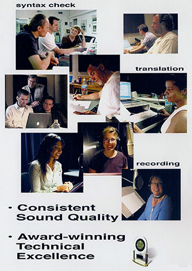
The steps towards defect-free recorded voice filesA full script review with the voice coach. We do a  syntax check and localize the files for Spanish, French Canadian and just about any other language you can name.  Being in the heart of Hollywood, there is an abundance of top quality voice coaches and voice talent in a wide variety of languages.

We make sure that translated files sound right.

We correct any script errors or bad translations before we get into the recording studio.

Step Two

While in the recording studio we bring files already recorded by that voice talent which we play for them before they record so they can match themselves.

Step Three

During recording we have a Quality Control person that makes sure every syllable is recorded as scripted.  That means no costly errors that have to be fixed later after bringing you much embarrassment, project delays and overruns. In twelve years of recording voice files, we have never missed a deadline. We have never gone over budget and never had to re-record incorrect files.

That’s because we have four levels of Quality Control, before, during recording, during editing and after editing before you get the final fileset.  So after the files are recorded, they are “cleaned” (the breaths and “mouth anomalies,” i.e. clicks and saliva noises are removed), edited and saved in the format you specify. We then listen to every file three times to make sure that everything is in order as scripted and labeled with the correct filename.

This avoids legal issues if a voice file triggered an incorrect driving maneuver for example, causing accident or injury or worse.

The Association has recorded tens of thousands of voice files for navigation and telematics applications since the beginning of car navigation systems.  We’ve recorded for JCI, Alpine, deCarta, Honda, Raytheon, Clarion and Hitachi.  We hope you’ll take this opportunity to get the service and quality that will make your career long and carefree. At least we’ll eliminate the needless hassles of voice recording.  Call us today.  We help computers understand human speech.